01 / Baseball practice prototype
Batting Lab
Read the pitch. Move the PCI. Time the swing. A standalone baseball trainer that makes each part of the at-bat easier to examine.
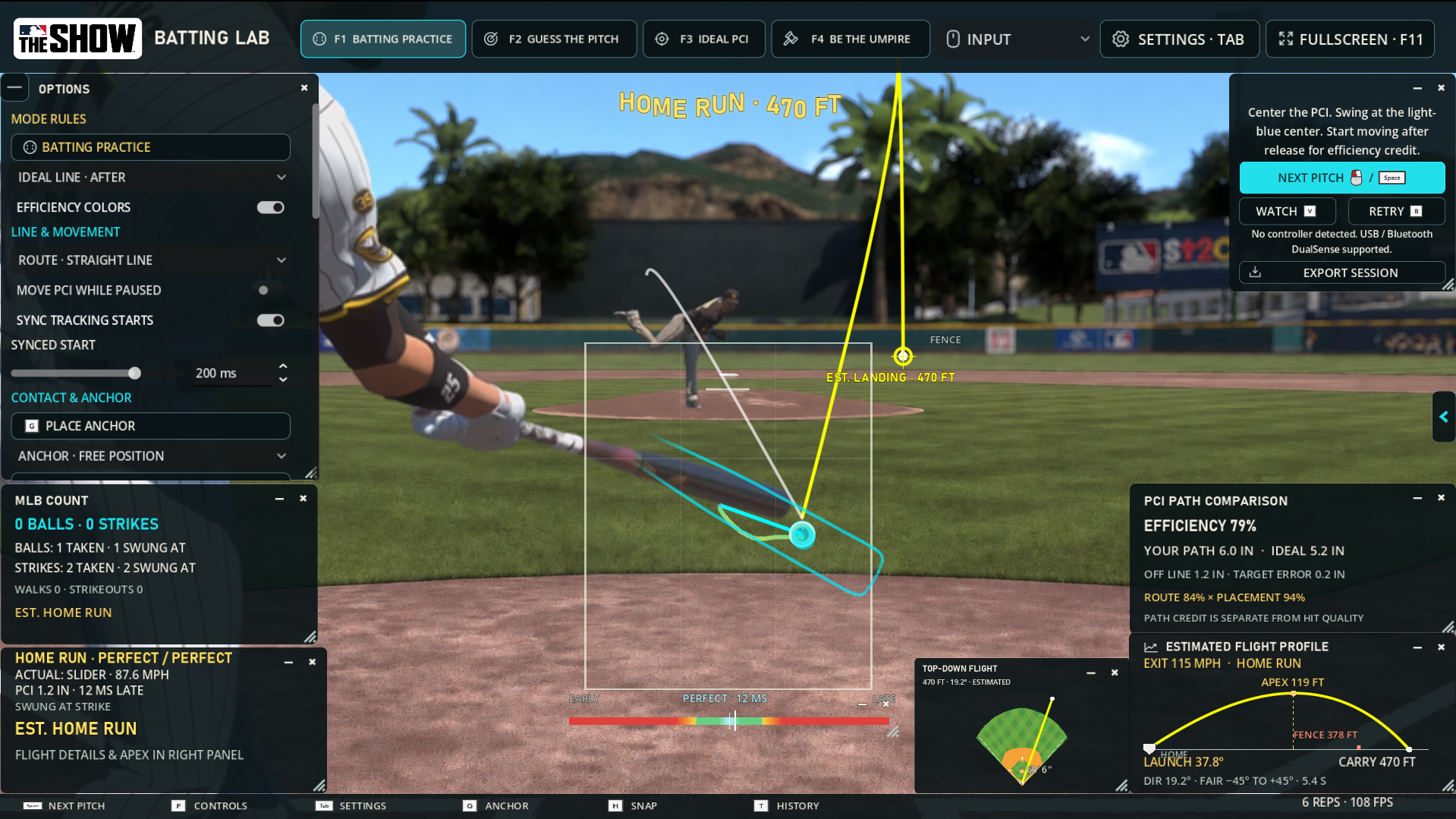
The idea
A hit-or-miss result leaves a lot unexplained. Did I misread the pitch, move too early, take an inefficient route, or mistime the swing? Batting Lab separates pitch recognition, Plate Coverage Indicator (PCI) movement, and contact timing into repeatable drills with distinct feedback.
I set the concept and feature priorities, using AI development tools to help turn those ideas into an evolving practice prototype. The emphasis is on useful drills and readable results.
Four ways to practice
Batting Practice
Read, track, take, or swing with manual PCI control. Feedback separates early/late timing, placement error, movement efficiency, contact quality, and estimated hit outcomes.
Guess the Pitch
Freeze the pitch at a configurable point and predict where it will cross the plate. Optional pitch-type guessing, a decision timer, and a contact preview add different challenges.
Ideal PCI
Watch an automatic PCI demonstrate an efficient route from a chosen anchor. Adjust its start time and contact offset to explore movement and projected launch.
Be the Umpire
Judge Ball or Strike after the strike-zone guide disappears. An optional location guess adds another challenge; the count follows the player’s call while accuracy is scored separately.
Make the drill specific
Control the pitch. Choose four-seam fastballs, sliders, circle changes, or curveballs. Set pitch frequencies, speed ranges, exact targets, selected tiles, or a drawn region. Strikes-only and balls-only options focus the exercise further.
Study the movement. PCI path analysis reports efficiency, distance traveled, ideal distance, maximum deviation, and target error. Adjustable anchors and scoring delays let the player compare different approaches to the same pitch.
See the timing. A live meter and shrinking contact ring make early and late windows visible. A rotating 3D baseball and magnified spin view support pitch recognition. The aids can be reduced or switched off.
Game-style speed presets range from Rookie through GOAT. Real Speed uses recorded baseball speed, spin, and flight-time data; Extreme Hitting adjusts timing and placement forgiveness separately.
Review, repeat, adjust
Replay reviews the delivery, ball path, recorded PCI movement, and swing timing without awarding a second result. Retry serves the same pitch again as a new scored attempt.
Contact feedback estimates exit velocity, launch, carry, direction, and fielding outcome. Multiple flight views use the same estimated trajectory; the optional 3D camera follows it to first landing.
Pitch history, named settings profiles, and session export support repeat practice and review. Feedback windows can be moved, resized, or hidden, with layouts saved per mode. Controller and mouse/keyboard input, remappable actions, and adjustable sensitivity let the player tailor the setup.
Details that matter
Some of the most useful work happens around a play. The project’s change history and checks cover whether the feedback and state remain correct when the player moves on, replays, or pauses.
Does the count match the decision?
Scenario
In umpire mode, the player calls a ball or strike. The call can differ from the actual pitch location.
Expected behavior
The player’s call changes the count; accuracy is evaluated separately. Four called balls walk, three called strikes strike out, and no call leaves the count unchanged.
Does a replay change the result?
Scenario
Play back a batted-ball flight, pause it, and watch it again.
Expected behavior
Playback should preserve the existing result, count, and history. Rewatching a play should not award another result.
Does the interface describe this pitch?
Documented issue
Walk and Strikeout labels could remain visible on later pitches. The v0.21 change notes record a fix.
Intended result
The count panel describes the latest pitch, so an old outcome does not confuse the next attempt.
Does pausing actually pause playback?
Scenario
Pause the ball-follow camera or move focus away from the application during flight.
Expected behavior
Flight should not advance unexpectedly while paused or out of focus. The v0.22 checks cover this behavior.
Examples drawn from the project’s change notes and automated regression checks.
Verification & limits
The v0.22 delivery records document passing regression, focused-feature, and exported-build checks covering controls, mode persistence, scoring, counts, contact, and flight playback. These checks verify implemented behavior; they do not establish that practice improves performance in MLB The Show.
An unofficial, standalone practice companion. Batting Lab does not connect to MLB The Show or use its source code or live telemetry. Game-style timing, contact, and fielding outcomes are the trainer’s own approximations. It does not simulate a complete baseball game; the flight camera stops at first ground contact without wall collisions or bounces.